

Identify
Capture risks as Jira work, with the context, ownership, categories, and links teams need to act.
Jira risk management software
Identify, assess, treat, monitor, and report on risk without moving delivery work into a separate system. ProjectBalm Risk Register adds purpose-built risk registers and matrices to the Jira environment your teams already use.
Available for Jira Cloud and Jira Data Center.
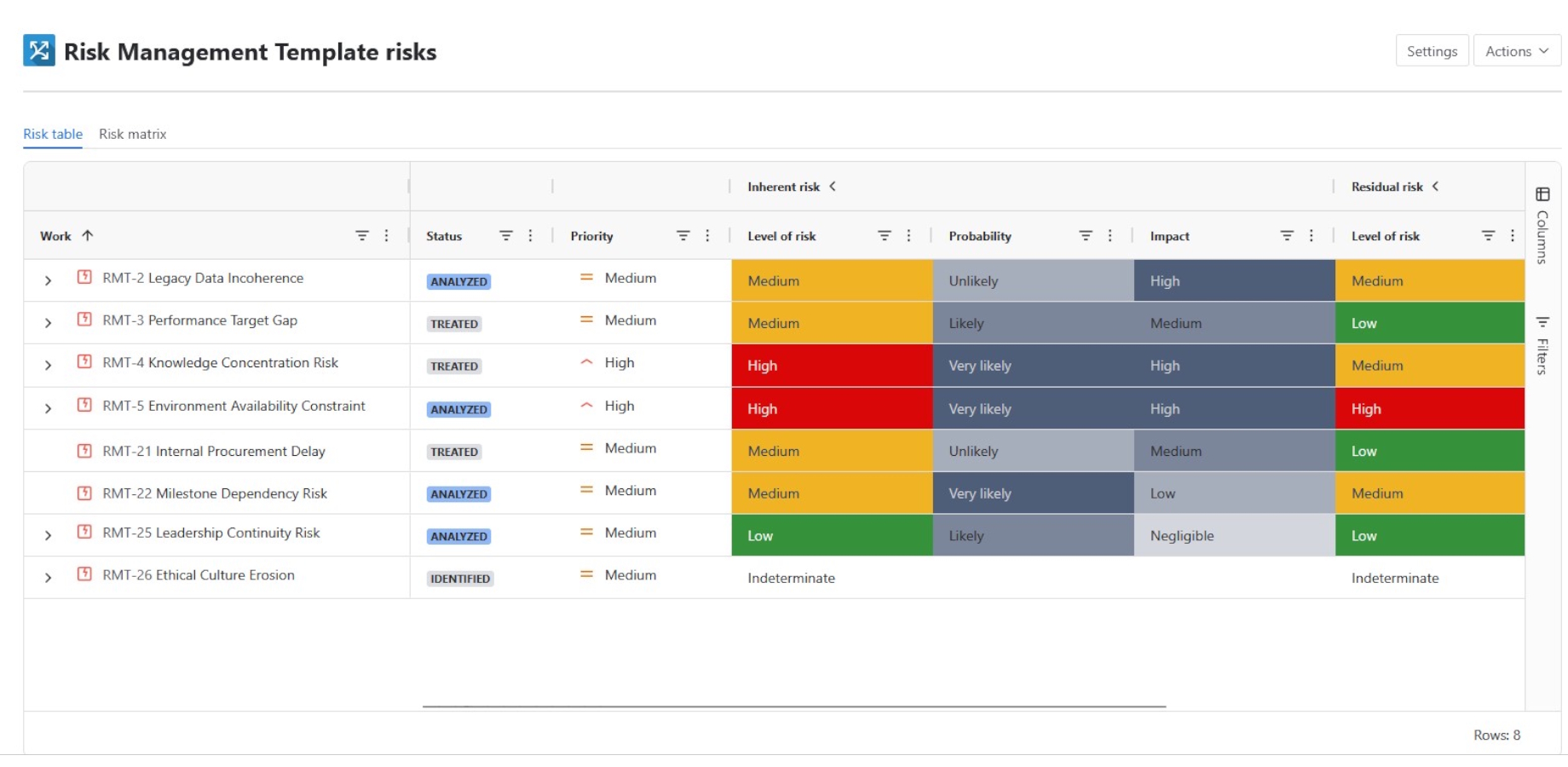




One place for risk and delivery
Spreadsheets and disconnected risk systems separate the register from the work that changes its outcome. Teams duplicate updates, ownership becomes harder to see, and reports can fall behind the current delivery picture.
Risk Register keeps specialist risk information close to Jira work, giving risk owners, delivery teams, and stakeholders a shared place to review exposure and act.
Fewer hand-offs between the risk register and delivery teams
Clear ownership alongside Jira workflows and responsibilities
Current register and matrix views built from Jira information
Treatment activity connected to the risk it is intended to change
The risk lifecycle
Capture risks as Jira work, with the context, ownership, categories, and links teams need to act.
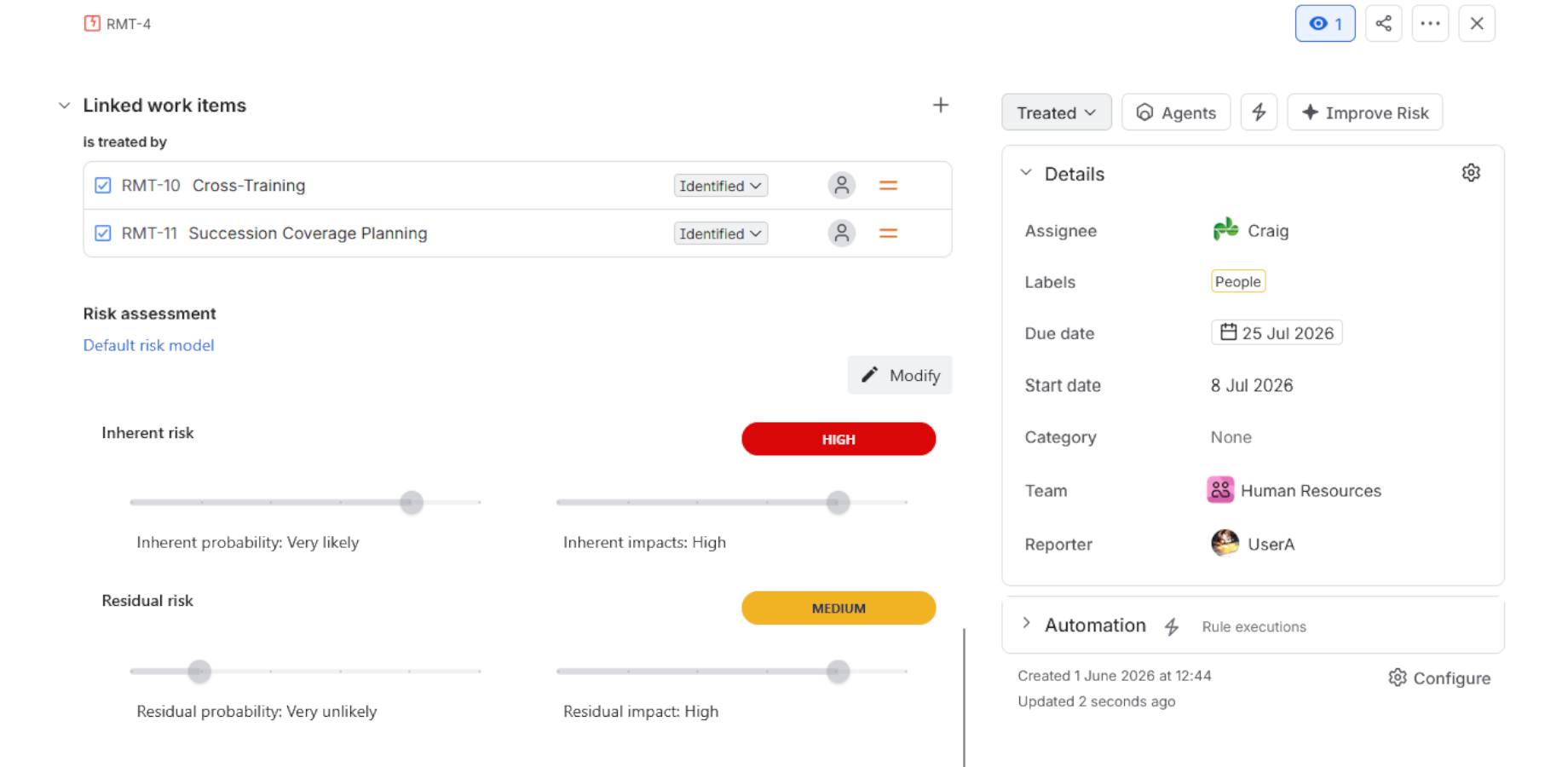
Apply a consistent model for probability and impact, then compare inherent and residual exposure.
Connect treatments and controls to accountable Jira work, owners, due dates, and workflows.
Review registers and matrices as risks, assessments, and treatment progress change.
Present current risk information in Jira dashboards and share it with stakeholders in Confluence.
Work stays connected
Risk information remains actionable because assessments, response work, and reporting share the same delivery environment.
Build or buy
Jira provides flexible building blocks. Risk Register adds a specialist layer for teams that do not want to design and maintain every part of a risk-management solution themselves.
| Need | Jira configuration alone | Jira with ProjectBalm Risk Register |
|---|---|---|
| Risk structure | Configure issue types, fields, screens, and workflows yourself. | Use a purpose-built risk register while retaining Jira work items and workflows. |
| Assessment | Create and maintain custom fields, calculations, and conventions. | Configure probability, impact, risk levels, colours, and matrix dimensions in a risk model. |
| Inherent and residual risk | Design a custom approach and keep its fields and calculations aligned. | Assess and compare exposure before and after treatment in the same experience. |
| Registers and matrices | Not supported natively. | Move between configurable register tables and interactive risk matrices. |
| Treatments | Model the relationship using your own issue types and links. | Treatments integrated into the risk register view along with other traceability artifacts. |
| Administration | Own the complete risk-management configuration and its ongoing maintenance. | Use a purpose-built Risk Register administration interface designed to make setup and ongoing changes straightforward. |
Core capabilities
Define the probability, impact, levels, colours, terminology, and matrix dimensions that support your methodology.
Build a register from a Jira project or saved filter, then use JQL sub-filters to focus a team, programme, or portfolio view.
Show exposure before and after treatment so teams can explain what a response is intended to change.
Connect response work to risks and use Jira assignments, workflows, due dates, comments, and history to manage delivery.
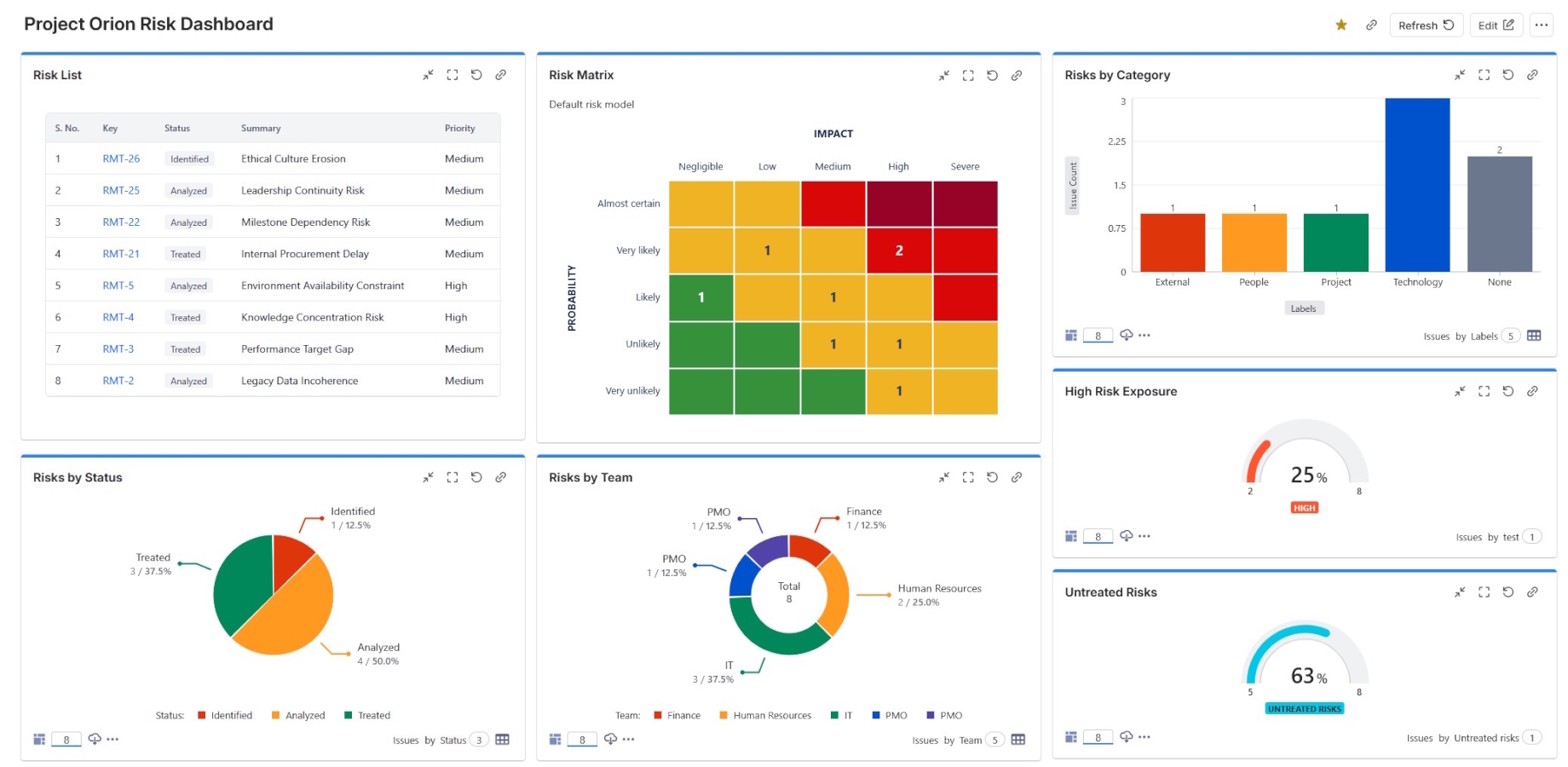
Review risk distribution visually, inspect a matrix cell, and open the underlying Jira work for more detail.
Add current risk information to Jira dashboards and bring live dashboards into Confluence using Smart Links.
Use cases
Adapt the approach to the governance, terminology, and delivery patterns that matter in your industry.
Connect operational, technology, and programme risk with accountable delivery work.
Explore the use caseCreate a consistent approach across programmes while keeping risk activity in Jira.
Explore the use caseTrack project and delivery risk where traceability and structured review matter.
Explore the use caseRelate delivery, change, security, and operational risk to the work teams already manage.
Explore the use caseGive teams a shared view of programme, supplier, operational, and change risks.
Explore the use caseBring project and operational risk into a connected, visible Jira workflow.
Explore the use caseDeployment options
Choose the edition that fits your Jira environment. Product details can differ between deployments, so use the relevant documentation when evaluating, configuring, or migrating Risk Register.
Follow the Cloud user guide for installation, configuration, and day-to-day product guidance.
Read the Cloud guideUse the Data Center guide to understand the setup and operation of Risk Register in a self-managed Jira environment.
Read the Data Center guideISO 31000 alignment
Risk Register supports an ISO 31000-aligned process for identifying, analysing, evaluating, treating, monitoring, and communicating risk. Organisations remain responsible for defining and operating their own risk-management framework.
Read the ISO 31000 implementation guideImplementation
Start with a clear operating model, then configure Risk Register around the Jira projects, permissions, and review routines your teams will actually use.
Frequently asked questions
Jira can be configured with issue types, fields, workflows, filters, and dashboards to record risk information. A specialist app is useful when you want purpose-built assessment, register, matrix, and treatment capabilities without designing and maintaining the complete model yourself.
No. Risk Register adds specialist risk-management capabilities while continuing to use Jira work items, workflows, ownership, permissions, search, links, comments, and history.
Yes. Teams can assess exposure before treatment and the expected or current exposure after treatment, making the relationship between response work and risk easier to discuss.
Risk Register supports shared configuration and supported project-level variation. The right setup depends on how much consistency and local flexibility your governance model requires.
Yes. Risk Register is available for Jira Cloud and Jira Data Center. Review the product documentation and version comparison when planning your deployment because implementation details can differ.
No software alone establishes compliance. Risk Register can support an ISO 31000-aligned process, while each organisation remains responsible for defining, governing, and operating its own risk-management framework.
ProjectBalm publishes security, privacy, and compliance material in its Trust Center, including information about its SOC 2 compliance.
Start a free trial of Risk Register, or review the app details on the Atlassian Marketplace.